You're driving home on a quiet evening when someone runs a red light and clips your front bumper. They jump out insisting you ran the light. No witnesses. No nearby cameras. Your word against theirs. That situation — more common than most drivers realize — is exactly why the question of whether is dash cam worth buying deserves a direct answer. For most drivers, it absolutely is. Browse our full automotive resource hub for more tools and upgrades that protect your car and your wallet.
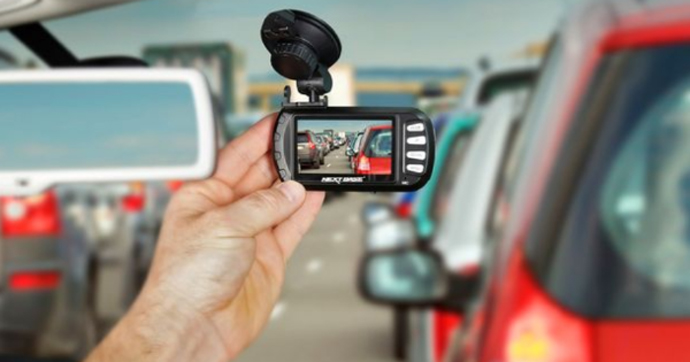
A dash cam records continuous footage while you drive and stores it on a looping memory card. When a collision or notable event happens, the camera locks that clip so it isn't overwritten. That locked file is your proof — timestamped, clear, and unambiguous. Modern units go further: GPS tracking, parking mode, lane departure alerts, and night vision are standard features on mid-range models priced under $150.
If you're unsure which camera style fits your vehicle, start with our detailed breakdown of Dash Cam vs. Mirror Cam before you buy. This guide focuses on the bigger picture: why you need one, what it actually costs, and how to use it correctly.
Contents
- Is a Dash Cam Worth Buying for the Long Term?
- When a Dash Cam Really Pays Off
- Immediate Benefits You Notice Right Away
- What a Dash Cam Actually Costs
- Front-Only vs. Front-and-Rear: A Side-by-Side Look
- Keeping Your Dash Cam Running Right
- Dash Cam Setup Tips You Shouldn't Skip
- Frequently Asked Questions
- Next Steps
Is a Dash Cam Worth Buying for the Long Term?
The short answer is yes — and the longer you drive, the more you'll appreciate having one. A dash cam isn't a gadget you install and forget. It's a passive documentation system that runs silently every time you get behind the wheel. Over months and years, that adds up to hundreds of hours of protected driving with zero effort on your part.
Building a Habit of Documentation
Most drivers don't think about vehicle protection until something goes wrong. A dash cam flips that mindset before anything happens. Once it's mounted and wired, it records automatically — you don't press record, you don't check settings, you just drive.
- Near-misses are captured, not just actual collisions
- GPS-enabled models log your route and speed on every trip automatically
- Cloud-synced cameras back up key clips without manual downloads
- Parking mode monitors your car even when you're not in it
Think of it the same way you approach keeping your vehicle mechanically sound. You change your oil, you replace worn filters, you stay on top of brake service — not because something is currently broken, but because prevention costs far less than repair. A dash cam fits exactly that logic. Small upfront cost, significant long-term protection.
How Footage Protects You Over Time
Insurance fraud is a real and documented problem on public roads. Insurance fraud schemes, including staged accidents and false injury claims, cost drivers billions in inflated premiums every year. A dash cam is direct protection against becoming the victim of a staged collision or a dishonest account.
Beyond fraud, footage resolves ordinary disputes. When both drivers give conflicting accounts of the same accident, whoever has video wins. Insurance adjusters, police officers, and attorneys all treat clear dash cam footage as definitive evidence. That's not an exaggeration — it's how claims are settled in practice.
Pro tip: Choose a dash cam with loop recording and G-sensor auto-lock — these two features work together to ensure critical footage is never accidentally overwritten after an incident.
When a Dash Cam Really Pays Off
Some scenarios make a dash cam's value immediately obvious. Others are quieter but just as impactful. Here's where real drivers see the clearest return on their investment.
Accident and Insurance Claims
This is the most cited reason people buy a dash cam — and the reasoning is solid. When a collision happens, your insurer needs to determine fault. Without objective evidence, that determination comes down to driver statements, which almost always conflict. Dash cam footage resolves it fast.
- Clear footage can prevent your rates from rising after a not-at-fault accident
- Some insurers use video evidence to accelerate and fast-track claim processing
- Footage showing the other driver's behavior — speeding, running a light — strengthens your position significantly
- In comparative fault states, fault percentages matter; video establishes exactly what happened
Several insurance providers in the U.S. and UK offer premium discounts to drivers who use dash cams. Discounts vary by insurer, but it costs you nothing to ask your provider directly whether they offer one.
Parking Lot Incidents and Hit-and-Runs
You come back to your car and find a fresh dent. The other driver is gone. Without parking mode enabled, you have nothing. With it, you have a timestamped recording of the exact moment of impact — often including the plate of the vehicle responsible.
Parking mode uses motion detection or G-sensor triggers to activate recording when your car is off. It requires a hardwire kit connected to your fuse box — a one-time install that costs roughly $15–$25 in parts. The first time someone hits your parked car and drives away, that small investment pays for itself entirely.
Immediate Benefits You Notice Right Away
You don't need to wait for an accident to get value from a dash cam. Several benefits kick in the moment it's installed and running.
Peace of Mind Behind the Wheel
Knowing your drive is on record changes how you feel in difficult traffic. When an aggressive driver tailgates you or cuts you off, your first thought stops being "what if this escalates?" and shifts to "I have this on camera." That mental shift is real. Drivers with dash cams report noticeably less anxiety in ambiguous road situations, particularly on high-traffic highways and unfamiliar routes.
Road rage incidents are another area where footage matters. If another driver follows you or confronts you, your camera captures the entire sequence. Law enforcement takes documented road rage incidents far more seriously than uncorroborated verbal accounts.
Improving Your Own Driving
This benefit surprises most people, but the data behind it is consistent. When you know your driving is being recorded — even by your own camera — you tend to drive more deliberately. You brake smoother, maintain better following distance, and think twice before an unsignaled lane change.
- Review footage after close calls to identify your own habits and blind spots
- Parents use dash cams to review trips with new teen drivers and give specific, footage-based coaching
- Fleet operators use camera footage to identify patterns across multiple drivers and vehicles
What a Dash Cam Actually Costs
Price is usually the first hesitation. But when you break it down honestly, a dash cam is one of the lowest-cost vehicle investments available — especially compared to what a single disputed insurance claim or parking lot repair costs out of pocket.
Entry-Level vs. Mid-Range vs. Premium
| Tier | Price Range | Resolution | Key Features | Best For |
|---|---|---|---|---|
| Entry-Level | $25–$60 | 1080p | Loop recording, G-sensor, basic night mode | Budget buyers, light urban use |
| Mid-Range | $60–$150 | 1440p–2K | GPS, Wi-Fi, improved low-light, wide FOV | Most drivers — best value tier |
| Premium | $150–$350+ | 4K front | Cloud backup, ADAS alerts, dual-channel, LTE | High-mileage, rideshare, fleet |
| Mirror Cam | $80–$200 | 1080p–1440p | Replaces rearview mirror, front + rear built-in | Drivers wanting a clean, hidden install |
The mid-range tier delivers the best return for the average driver. Units in the $100–$130 range offer 2K resolution, reliable GPS logging, and solid night performance. You don't need to spend $300 to get meaningful protection — the core features that matter in a claim are available well below that threshold.
Hidden Costs to Account For
The sticker price isn't the complete picture. Budget for these additional items:
- High-endurance microSD card: $10–$25 for 64–128GB rated for constant-write use — never use a standard phone card
- Hardwire kit: $15–$25 for parking mode capability — essential if you park on public streets
- Professional installation: $50–$100 if you want a clean hidden-wire setup with no visible cabling
- Card replacement: plan to replace the SD card every 12–18 months, as constant-write use degrades cards faster than normal storage
Total realistic first-year cost for a solid setup: $90–$200. Compare that to a typical hit-and-run repair or a 15% rate increase from a disputed claim, and the math is straightforward.
Warning: Never use a standard SD card in a dash cam — constant-write conditions burn through non-rated cards quickly and create recording gaps exactly when you need footage most.
Front-Only vs. Front-and-Rear: A Side-by-Side Look
One of the first configuration decisions you'll face is whether to go single-channel or dual-channel. Both setups have clear use cases, and the right choice depends on how and where you drive.
Which Setup Fits Your Driving?
A front-only camera covers the majority of collision scenarios — roughly 70% of accidents involve the front of the vehicle. If you drive in lighter traffic and park in a private garage, a single-channel unit is likely sufficient for your needs.
A front-and-rear system adds a second camera pointed out the back window. This protects you from rear-end collisions — where the other driver may falsely claim you reversed into them — and captures tailgating behavior. For highway drivers and urban commuters, the rear camera is worth the extra $20–$50 over a front-only unit.
- Front-only: simpler install, lower cost, handles most accident scenarios
- Front-and-rear: full coverage, essential for proving fault in rear-end situations
- Mirror cam: replaces your rearview mirror entirely, built-in front and rear coverage, cleanest install option
If you're thinking about broader vehicle security alongside your dash cam purchase, pairing it with quality wheel locks gives you overlapping deterrence against both opportunistic theft and collision fraud.
The Insurance Angle

Some insurers offer a discount for verified dash cam use. While this isn't yet universal across U.S. providers, it's becoming more common as carriers recognize the measurable reduction in fraudulent claims. Even a 5% discount on a $1,200 annual premium saves $60 per year — enough to offset the cost of a mid-range camera in under two years.
Beyond discounts, footage that clearly establishes you were not at fault prevents a rate increase after an accident. A single not-at-fault accident can raise premiums by 10–20% with some insurers, even when you caused nothing. Footage that resolves the claim correctly eliminates that increase entirely. That's the strongest financial case for a dash cam: not just discounts, but avoiding costs that never appear on your bill.
Keeping Your Dash Cam Running Right
A dash cam demands less attention than almost any other piece of vehicle equipment — but it isn't zero maintenance. Skipping a few simple upkeep steps can lead to recording failures right when you need footage most.
SD Card Maintenance
The SD card is the most failure-prone component in any dash cam. Constant-write environments degrade storage media faster than typical photo or video use. Here's what to do:
- Use a high-endurance microSD card (Samsung PRO Endurance, SanDisk High Endurance) specifically rated for dashcam applications
- Format the card in-camera every 2–4 weeks to clear filesystem errors before they compound
- Replace the card every 12–18 months regardless of apparent performance — degraded cards fail without warning
- Before formatting, back up any critical footage to your phone or computer
Most recording failures trace back to a degraded or incompatible SD card. A $15 replacement card is the cheapest insurance you can buy for your entire dash cam setup.
Lens and Mount Upkeep
Road grime, dust, and condensation accumulate on the lens over time. A dirty lens reduces footage clarity — which defeats the entire purpose of having a camera in the first place. Clean it with a microfiber cloth every few weeks, the same type you'd use on your glasses or interior mirrors.
- Check the mount adhesive or suction cup every few months; heat loosens adhesive mounts in summer climates
- Inspect wiring along the A-pillar and headliner for chafing near door seals
- Verify the camera starts automatically when you turn the ignition — test this monthly
- In winter, allow the lens to warm up before assuming a cloudy image is a defect
Dash Cam Setup Tips You Shouldn't Skip
Installation seems straightforward, but a few small decisions at setup time have an outsized impact on footage quality and real-world usefulness. Get these right from day one.
Optimal Placement and Angle
Mount your dash cam centered on the windshield, positioned just behind the rearview mirror. This keeps it out of your sightlines, places it within legally acceptable windshield zones in most states, and gives the lens a clean, unobstructed forward view of the road.
- Angle the lens slightly downward to capture both the roadway and license plates at close range
- Avoid mounting too high on the glass — you'll lose the bottom of the frame needed to catch plates at intersections
- Keep the camera outside the reach of windshield wipers to eliminate smear artifacts during rain
- If your windshield has metallic tint or an embedded antenna, verify it doesn't interfere with the camera's GPS reception
Route the power cable along the headliner and down the A-pillar to the fuse box or a USB port in the dash. A clean cable run keeps the cabin uncluttered and prevents the cord from becoming a visual distraction while driving.
First Settings to Configure
Out of the box, most dash cams need several adjustments before they're ready for real-world use. Configure these before your first drive:
- Date and time: set these accurately — a timestamp is worthless in a claim if it's wrong by hours or days
- Resolution: set to the highest resolution your SD card can sustain without dropping frames
- Loop segment length: 1–3 minute segments give you more granular clips to work with after an event
- G-sensor sensitivity: start at medium — too sensitive causes constant locking in rough traffic; too low means minor impacts won't trigger auto-save
- Parking mode: enable it only if you have a hardwire kit installed; running it off USB power drains your battery overnight
Review the first couple days of footage to confirm the camera angle, exposure, and audio are correctly set. Make adjustments early — don't wait for an incident to discover the lens was pointed at the headliner or the night footage is overexposed.
Frequently Asked Questions
Is a dash cam worth buying if I already have full coverage insurance?
Yes. Full coverage pays for repairs, but it doesn't prevent a rate increase if fault is disputed and assigned to you incorrectly. Dash cam footage that proves you weren't at fault keeps your driving record clean and your premium stable — something your insurance policy alone cannot do.
Do dash cams record when the car is off?
Only if the camera supports parking mode and is connected via a hardwire kit to your fuse box. Standard USB or OBD power cuts off with the ignition. Parking mode uses motion or impact triggers to record short clips while the vehicle is parked, without draining your battery.
Will a dash cam lower my car insurance premium?
Some insurers in the U.S. and UK offer discounts for dash cam use — coverage varies by provider, so contact your insurer directly to ask. The bigger financial benefit is preventing a wrongful fault determination that would otherwise raise your rate by 10–20% after a not-at-fault accident.
How long does dash cam footage stay on the SD card?
It depends on card capacity and recording resolution. A 128GB card at 1080p typically stores 16–24 hours of continuous footage before loop recording overwrites older clips. At 4K, that window shrinks to 6–10 hours. Clips flagged by the G-sensor or manually locked are never overwritten by the loop.
Is it legal to use a dash cam while driving?
Dash cams are legal to use in all 50 U.S. states. Windshield placement rules vary by state — most require the camera to be mounted in a position that does not obstruct the driver's field of view, typically behind or adjacent to the rearview mirror. Check your state's specific windshield obstruction statutes if you're uncertain.
What resolution do I actually need in a dash cam?
1080p is the minimum for reliably capturing license plates at a distance. 1440p (2K) is the practical sweet spot for most drivers — it delivers sharp, usable footage in claims and is available on cameras priced well under $150. 4K is worth considering for rideshare drivers or high-mileage commuters who need maximum detail, but it generates more heat and requires larger storage cards.
Next Steps
- Decide on your tier: go mid-range ($60–$150) for the best balance of features and price — entry-level if budget is tight, premium only if you drive professionally or for rideshare.
- Order a high-endurance microSD card (64–128GB) at the same time as your camera — don't use a card you have lying around, and don't skip this step.
- Install the camera centered behind your rearview mirror with the cable routed cleanly along the headliner and A-pillar; if you want parking mode, budget an additional hour for the hardwire kit installation.
- Set the correct date, time, resolution, and G-sensor sensitivity on first boot, then review your first two days of footage to confirm angle, exposure, and audio are properly configured.
- Call your insurance provider and ask directly whether they offer a discount for documented dash cam use — a 5% reduction on most annual premiums covers the cost of a mid-range camera within two years.


About Chris Lewis
Chris Lewis developed a deep knowledge of automotive filtration, maintenance, and repair through years of hands-on experience working on vehicles — a passion rooted in time spent in his father's San Francisco auto shop from an early age. He has practical familiarity with air, oil, fuel, and cabin filter systems across a wide range of vehicle makes and models, along with experience evaluating the tools and equipment that serious DIY mechanics rely on. At MicrogreenFilter, he covers automotive and motorcycle filter reviews, maintenance guides, and automotive tool recommendations.
Get FREE Filters now. Or latest free tools from our best collections.
Disable Ad block to get all the secrets. Once done, hit any button below